Independent Uploady Premium guide

Uploady Free vs Premium: Speed, Waiting Time and Limits

Uploady can be used for free, but the free account is mainly suitable for occasional small downloads. If you download large files, split RAR archives, videos, or several links in one session, the difference between Free and Premium becomes much easier to notice.

Check Uploady Premium

Updated: 2026-07-20

This page compares Uploady Free and Uploady Premium by speed, waiting time, CAPTCHA, resume support, daily limits, and download-manager usability.

Important note: download speed can vary by location, internet connection, file server, time of day, and the number of active downloads. The screenshots below show our own test results, not guaranteed speeds for every user.

Quick Comparison: Uploady Free vs Premium

FeatureFree AccountPremium Account
Download speedLimited speedMuch faster in our tests
Waiting timeUsually requiredNo normal waiting timer
CAPTCHAUsually requiredNormally removed during Premium downloads
Resume supportLimited or unreliableBetter support for interrupted downloads
JDownloaderLimited practical valueUseful for queues and multiple links
Best forSmall occasional filesLarge files, split archives, regular downloads

Plan details, pricing, storage, and daily download volume can change. Always check the current Uploady.io Premium page before buying.

Real Speed Test: Free Browser Download

In our free browser test, one Uploady file downloaded at around 461 KB/s. For a file under 1 GB, the estimated remaining time was still close to half an hour.

This can be acceptable for a small file. It becomes much less practical when you need a large archive or several parts of a split RAR file.

Uploady free browser download speed test showing 461 KB/s
Uploady free browser test: one file downloaded at around 461 KB/s.

Real Speed Test: Premium Browser Download

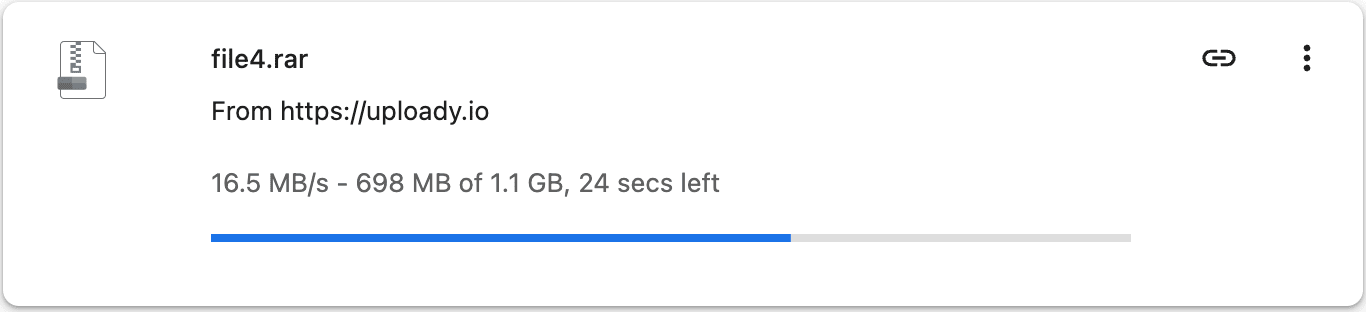
With Uploady Premium, the browser result was much faster. In our single-file Chrome test, the speed reached around 16.5 MB/s.

For larger files, this difference changes the whole experience. A file that takes a long time on the free account can finish much faster with Premium, depending on your connection and the Uploady server used for that file.

Uploady Premium browser download speed test showing 16.5 MB/s
Uploady Premium browser test: one file reached around 16.5 MB/s in Chrome.

Premium with JDownloader

Uploady Premium is also more practical with JDownloader. In our test, several Uploady links downloaded in parallel with an average speed around 33.83 MiB/s.

This matters most when you have many links or a split archive. Instead of opening each file page manually, JDownloader can queue the links and manage the downloads more efficiently.

Uploady Premium JDownloader speed test showing average speed around 33.83 MiB/s
Uploady Premium in JDownloader: multiple links downloaded together with an average around 33.83 MiB/s.

When the Free Account Is Enough

The free Uploady account is enough if you only download small files from time to time. For example, if you need one small document, one audio file, or one small archive every few weeks, Premium may not be necessary.

The free option also makes sense if you do not mind waiting and do not need download automation. You can still get the file, but the process will usually be slower and less convenient.

When Premium Makes a Clear Difference

Uploady Premium is more useful when you download large files or repeated batches. The advantage is not only faster speed. It also reduces the friction around each download.

With Premium, you avoid most of the common free-account interruptions: waiting timers, CAPTCHA prompts, slow transfer speed, and weaker resume support. This is especially useful for split RAR archives and long download lists.

Premium is also the better choice if you use JDownloader. For browser-only users, Premium is still faster. But for people downloading multiple files, JDownloader plus Premium is usually the more efficient setup.

Final Verdict: Free or Premium?

The free account is still fine for light use. If you only download a small file occasionally, you do not need to pay.

Premium is the better choice if you regularly download large files, split archives, or several links in one session. Our tests showed a clear difference between the free browser speed and Premium browser/JDownloader performance.

For the full verdict, plan advice, and Premium feature breakdown, read our Uploady Premium review. For current plan details, see the Uploady Premium pricing guide.

Check Uploady Premium