In this review, we focus on the practical question: is Uploady Premium actually worth paying for? We tested browser downloads, JDownloader performance, Premium workflow, plan limits, and the difference between regular and heavy use.
Quick Verdict
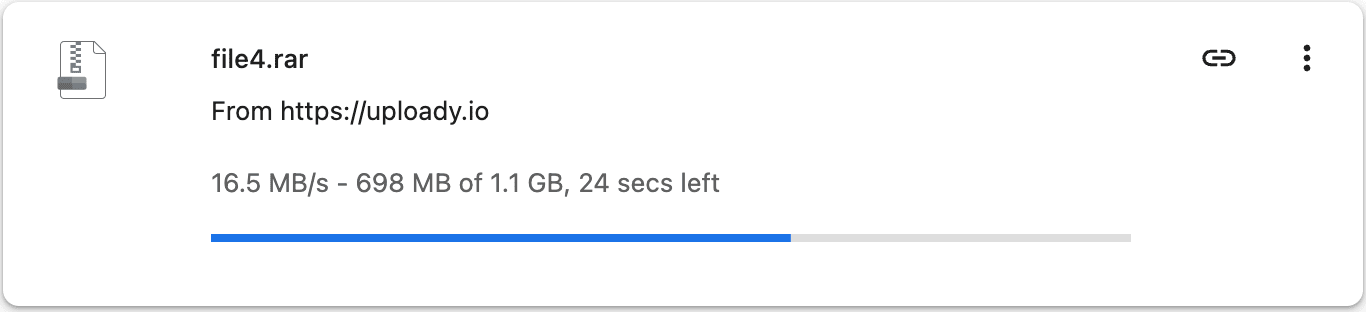
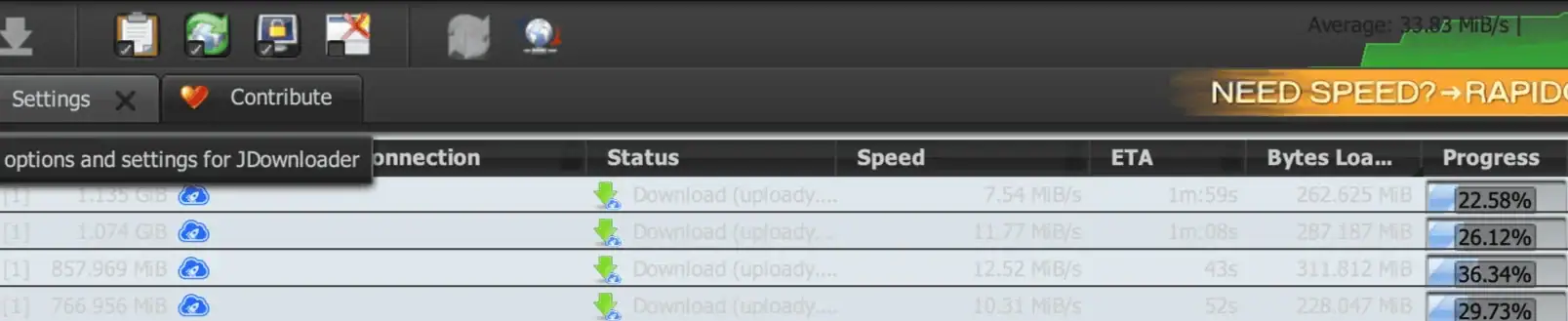
Uploady Premium is worth it if you download large files or multi-part archives on a regular basis. In our tests, a single browser download reached around 16.5 MB/s, and JDownloader averaged around 33.83 MiB/s across multiple links.
If you only download a small file once in a while, the free account may still be enough. Premium becomes much more useful when you deal with large archives, repeated downloads, or JDownloader queues.
Pros and Cons
Pros
- Much faster than the free account in our tests
- No normal waiting timer before Premium downloads
- No CAPTCHA during normal Premium downloads
- Works well with JDownloader for multiple links
- Better resume support for interrupted downloads
- Useful for split RAR archives and large file sets
Cons
- Not necessary for occasional small downloads
- Daily download volume depends on the plan you choose
- Actual speed still varies by server, location, and time of day
- Pricing and limits can change, so plan details should be checked before purchase
What Does Uploady Premium Actually Give You?
High Download Speeds
Premium removes the main free-account speed restrictions. In our browser test, one Uploady Premium file reached around 16.5 MB/s.
No Normal Waiting Timer
Premium downloads usually start without the waiting timer that free users may see before each file. This matters most when downloading several files in a row.
Resume Downloads
If your connection drops or a download is interrupted, Premium gives better support for resuming the file instead of starting again from the beginning.
No CAPTCHA During Normal Premium Downloads
Premium users normally do not need to solve CAPTCHA for each download. This is especially helpful for multi-part archives with many separate files.
Daily Bandwidth and Storage
Premium plans include higher storage and daily download limits. Standard Premium plans usually range from 50 GB/day to 150 GB/day, while Premium Pro plans can go up to 300 GB/day.
JDownloader Support
Uploady Premium works well with JDownloader, making it easier to queue multiple links, download archive parts, and manage larger batches without opening every file page manually.
Free vs Premium: Short Summary
This review focuses on the Premium account itself. For a full side-by-side comparison with the free speed screenshot, read Uploady Free vs Premium.
| Area | Free | Premium |
|---|---|---|
| Speed | Restricted | Much faster in our tests |
| Waiting | Usually required | No normal waiting timer |
| CAPTCHA | Usually required | Normally removed |
| JDownloader | Limited practical value | Useful for multiple links |
| Best for | Small occasional files | Large files and regular downloads |
Our Uploady Premium Speed Test
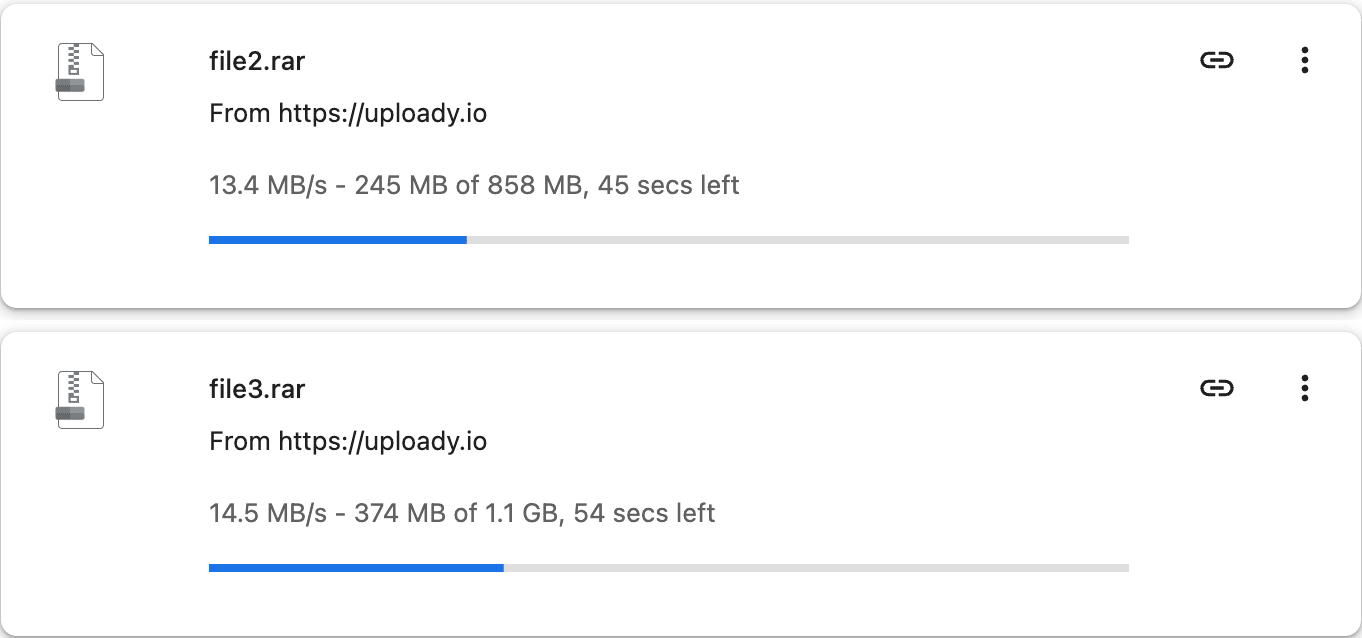
We tested Uploady Premium using both direct browser downloads and JDownloader. In our browser test, a single file reached around 16.5 MB/s. With multiple browser downloads running at the same time, several files showed roughly 13–16 MB/s per file. In JDownloader, multiple Uploady links downloaded together with an average speed of around 33.83 MiB/s.
These are our own test results only, not guaranteed speeds for every user. Actual speed can vary depending on your location, internet connection, file server, time of day, and how many downloads are running at once.


JDownloader Test: How Uploady Premium Performs with Multiple Links
JDownloader is where Uploady Premium becomes more useful than a single browser download. A browser test shows one-file speed, but many Uploady users deal with archives split into several parts. In that situation, queue handling and parallel downloads matter more than one single-file result.
In our test run, JDownloader kept several Uploady links active at the same time and showed an average speed around 33.83 MiB/s. This does not mean every user will get the same result, but it does show why Premium is more practical for larger batches.
| JD2 Test Metric | Observed Result |
|---|---|
| Parallel links | Multiple active downloads |
| Average batch speed | Around 33.83 MiB/s |
| Single-file browser result | Around 16.5 MB/s |
| Waiting timer / CAPTCHA | Not required during normal Premium downloads |
| Resume support | Better than free account use |
For anyone downloading large volumes, JDownloader plus Premium can remove a lot of manual work. You add the links once, let the queue run, and avoid opening each Uploady page one by one.
Pricing and Value: Which Plan Makes Sense?
Uploady Premium plans differ by duration, daily download volume, and storage. A short plan is useful for testing, while longer plans usually reduce the effective cost per day. Pro plans mainly exist for users who need more daily download volume.
For most users, a longer Standard plan is the better value. Standard plans typically range from 50 GB/day to 150 GB/day, depending on duration. Premium Pro plans can go up to 300 GB/day, but they only make sense if the daily limit is your real bottleneck.
Before choosing a plan, think about your actual usage. If your downloads are spread across several days, Standard may be enough. If you need to download a very large archive in a short period, Pro may be more suitable.
For plan-by-plan pricing, see the Uploady Premium pricing guide.
Who Should Buy Uploady Premium?
Uploady Premium is most useful for users who download large files, split RAR archives, video sets, backup packages, or multiple links in one session. It is also a good fit for users who prefer JDownloader and want to avoid repeated waiting timers and CAPTCHA checks.
Premium is less necessary if you only download small files occasionally. In that case, the free account may still be acceptable, even if it is slower and less convenient.
Premium is a good fit if you:
- download from Uploady several times per week;
- handle large archives or multi-part RAR files;
- use JDownloader or another download manager;
- want better resume support;
- want fewer manual steps before each file.
About This Review
This review is based on publicly available Uploady plan information, our own browser and JDownloader speed tests, and common real-world download scenarios such as large archives, split RAR files, and download manager use.
Uploady plan details, pricing, storage, and daily bandwidth limits may change over time. Always check the latest information on Uploady.io before purchasing a Premium account.
Final Verdict
Uploady Premium is a solid upgrade for users who download from Uploady regularly. The biggest advantages are faster speeds, fewer interruptions, better resume support, and smoother use with JDownloader.
For light use, the free account is still usable. But for large files, split archives, repeated downloads, and JDownloader queues, Premium is the more practical option.