
Do You Need Uploady Premium?
Free downloads on Uploady are officially capped at 100 KB/s. In my testing they actually ran closer to 461 KB/s — a 767 MB file took about 28 to 30 minutes. You still get a countdown timer, a captcha before every download, and if you’re not on a paid plan, inactive files get deleted after 3 to 30 days.
If you regularly handle large files, multi-part RAR archives, or automated JDownloader queues, Premium becomes a serious time-saver. On my home fiber connection, Premium reached 16.5 MB/s in the browser and 42.14 MiB/s combined in JDownloader 2, against 461 KB/s on the free tier.

5 Core Benefits of Uploady Premium
1. Zero Waiting Timers & Captchas
Click the download link and the transfer starts immediately. No countdown clocks, no pop-up advertisements, and no captcha steps standing between you and your file.
2. Multi-Thread & Parallel Downloads
Download multiple links at once. Free accounts are effectively limited to one throttled download at a time; Premium lets your browser or download manager run parallel streams and actually use your bandwidth.
3. Download Resume Support
Connection dropped mid-transfer? Premium supports download resume, so an interrupted download continues from where it stopped instead of restarting a multi-gigabyte file from zero.
4. Extended File Retention & Security
With a Premium account, uploaded files stay on the servers for the life of your subscription, with up to 60 days of inactivity before removal. You can also lock files with security codes and passwords, so they’re only accessible through the links you share.
5. Verified JDownloader 2 Integration
Uploady Premium works with JDownloader 2 and other popular download managers. Add your account credentials to the LinkGrabber, queue your links, and let the queue run without you watching it.
Uploady Premium Plans at a Glance
Uploady offers two main account tiers: Premium for general users and Premium Pro for heavy daily bandwidth needs.
| Plan Tier | Duration | Storage | Daily Bandwidth | Best For |
|---|---|---|---|---|
| Premium | 30 Days ($14.99) | 2.0 TB | 50 GB / day | Testing speed & short download batches |
| Premium | 365 Days ($89.99) | 10.0 TB | 150 GB / day | Best Value for regular users & long-term storage |
| Premium Pro | 30 Days ($27.99) | 2.0 TB | 80 GB / day | High-volume daily transfers |
| Premium Pro | 365 Days ($149.99) | 10.0 TB | 300 GB / day | Heavy archive users who need the largest daily allowance |
Note: Payment options include Credit Cards, PayPal, Alipay, Google Pay, Skrill, and Crypto. Prices and specs can change on the official checkout page. The 30-day Premium plan is a good first test; the 365-day plan gives the lowest monthly cost.
Free vs. Premium Comparison
| Feature | Free Tier | Premium Account |
|---|---|---|
| Download Speed | Capped at ~100 KB/s officially; 461 KB/s in my free test | 16.5 MB/s browser, 42.14 MiB/s JDownloader (my test) |
| Waiting Timer | Mandatory countdown | Instant start |
| Captchas | Shown during free downloads in my test | None |
| Parallel Downloads | Restricted in practice | Two files reached 13.4 + 14.5 MB/s (~28 MB/s combined) in my test |
| Download Resume | Not available on free accounts in my testing | Native resume support |
| JDownloader Support | Not usable with free accounts in my testing | Works with JDownloader 2 in my tests |
| File Retention | Deleted after 3–30 days of inactivity | Kept for the subscription period, up to 60 days if inactive |
| Daily Traffic | Severely limited in practice | 50–300 GB per day depending on plan |
Real Speed Test Summary
I bought an Uploady Premium account with my own money to measure actual performance instead of relying on marketing claims. Test network: home fiber broadband, 2026. Here’s what I measured:
- Browser Single File: Stabilized at 16.5 MB/s on a 1.1 GB file, no extra plugins needed.
- Browser Parallel Files: Two simultaneous downloads ran at 13.4 MB/s and 14.5 MB/s — about 28 MB/s combined.
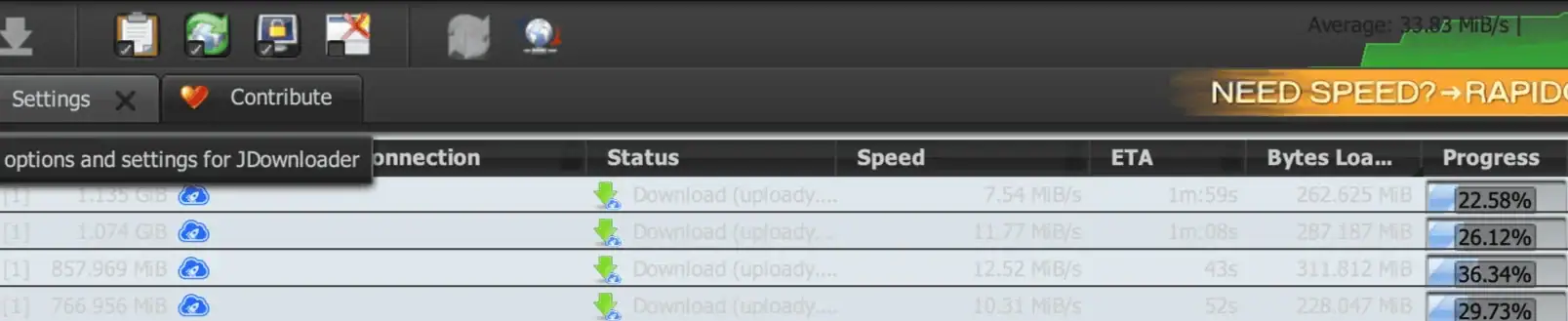
- JDownloader 2 Multithreaded: Hit 42.14 MiB/s combined across 4 active threads (7.54 / 11.77 / 12.52 / 10.31 MiB/s individually).
Uploady’s official page lists up to 65 MB/s for Premium Pro — that’s their stated figure, not something I hit in testing. On a home connection, your real speed depends on your own line, routing, and server load at the time you download. I didn’t push past 42.14 MiB/s combined even with four threads running, and that’s a realistic number to plan around rather than the ceiling.
Practical Use Cases
- Large Individual Files (10 GB+): Skip hours of browser waiting time; pull large ISOs, design assets, or video archives in minutes.
- Multi-Part RAR Archives: Download
.part1.rar,.part2.rar, etc., all at once without cooldown timers between files. - Automated JDownloader Queues: Copy an entire folder or pastebin of Uploady links into JDownloader 2, and let your PC handle batch downloads while you step away.
Explore Our Uploady Guides
- Read Full Uploady Speed Test & Review →
- Uploady Premium Pricing & Plan Comparison →
- How to Setup Uploady with JDownloader 2 →
- Uploady Frequently Asked Questions (FAQ) →
Independent Portal Disclaimer
This website operates exclusively as an independent information and testing portal. I have no official affiliation, partnership, or authorization from Uploady or its parent operators. All trademarks belong to their respective owners. I do not host, store, or distribute files.